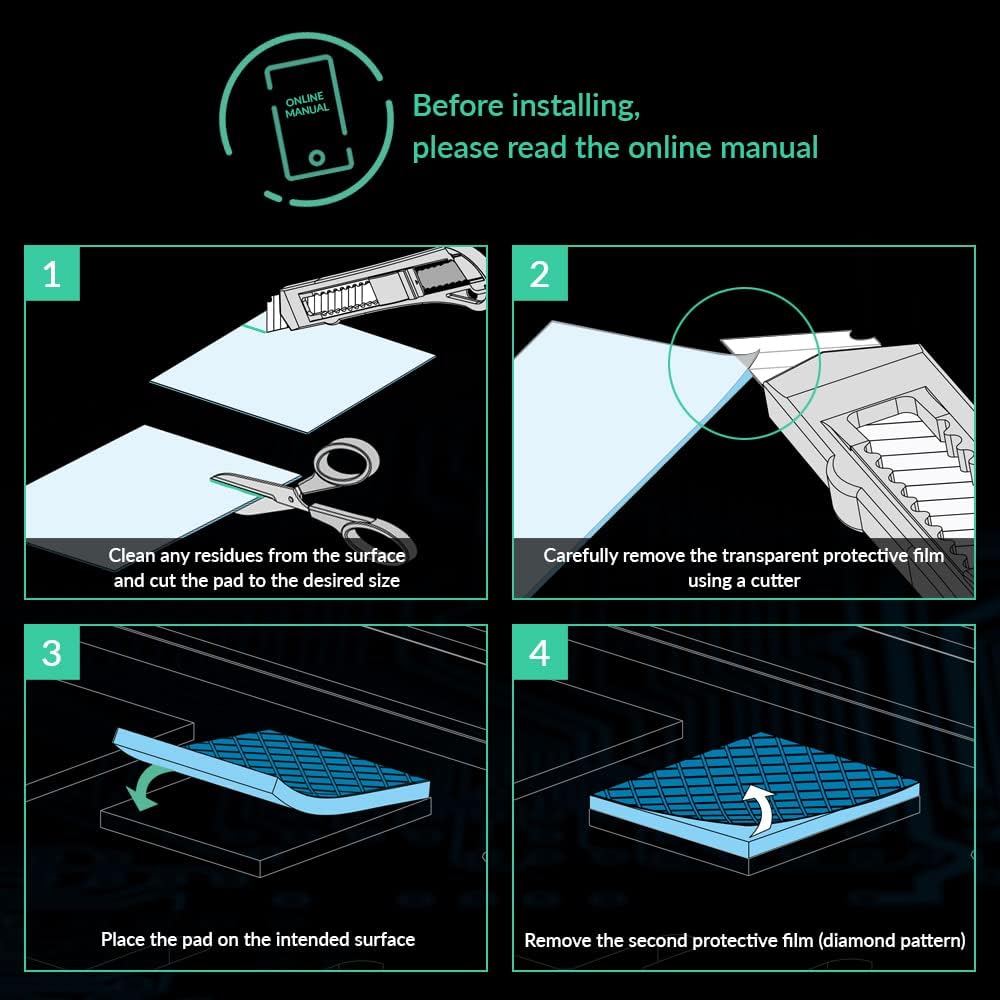
If you’ve ever noticed your GPU fan ramping up aggressively during a gaming session — or seen your M.2 SSD throttle to half its rated speed under a sustained file transfer — thermal pads might be the fix you didn’t know you needed. A thermal pad is a soft, compressible sheet of material that bridges the gap between a chip and the metal heatsink sitting above it. Unlike thermal paste (which you apply as a liquid or gel directly to a CPU or GPU die), pads are used on components where the gap is too large and uneven for paste to fill properly — think GPU memory chips, SSD controllers, or the voltage-regulating circuitry on a graphics card. They’re cheap, they’re replaceable, and getting them wrong costs you performance. Getting them right can drop component temperatures by 10–20°C in well-documented cases. This guide will walk you through the two numbers that actually matter — thickness and conductivity — and give you a clear buy decision for the three most common applications.
Why Thermal Pads Degrade and When to Replace Them
The pads that ship from the factory with your GPU or motherboard are functional, but they’re not selected for enthusiast longevity. Reviewers at Tom’s Hardware and Igor’s Lab have documented that stock pads on mid-range and high-end GPUs frequently measure in the 3–6 W/mK conductivity range, sometimes lower, and are often cut to minimum viable coverage to keep assembly costs down. Over 12–24 months of sustained loads, the silicone matrix in a pad dries out slightly, compliance (the pad’s ability to conform under pressure) drops, and the thermal interface degrades.
The symptoms are gradual: a GPU that used to idle at 72°C on VRAM now idles at 82°C. An M.2 drive that never throttled now throttles on the second pass of a large sequential write. A VRM heatsink that barely got warm now gets uncomfortably hot to the touch after a long Cinebench run.
Three triggers that make pad replacement worth your time:
- GPU VRAM temperatures above 90°C under sustained load — increasingly visible since GDDR6X cards expose junction temps in monitoring software.
- SSD throttling during sustained writes, even when ambient temperatures are reasonable.
- VRM thermals above 100–105°C under a heavy all-core workload, especially on motherboards with compact heatsink designs.
PC Mag’s overview of thermal interface materials notes that aftermarket pad replacement is one of the highest-ROI thermal interventions available because the materials cost $5–$25 and the gains are measurable rather than marginal.
The Two Numbers That Actually Matter: Conductivity and Thickness
Thermal Conductivity (W/mK)
Conductivity is rated in watts per meter-kelvin (W/mK) — think of it as how aggressively the pad moves heat from the chip into the heatsink. Higher is better, with diminishing returns above a certain ceiling depending on the application.
By the numbers:
| Conductivity Range | Typical Use | Representative Products |
|---|---|---|
| 6–8 W/mK | Budget SSD covers, light VRM duty | Gelid Extreme, Thermalright ODYSSEY |
| 12–14 W/mK | VRAM, mainstream VRMs, NVMe heatsinks | Thermal Grizzly Minus Pad 8, Fujipoly XR-m |
| 16–20 W/mK | High-power VRMs, GDDR6X VRAM replacement | Thermal Grizzly Minus Pad 8 (12.5), Kingpin KPx |
| >20 W/mK | Exotic / phase-change adjacent | Honeywell PTM7950 (pad variant), Fujipoly XR-m Ultra |
The jump from 6 W/mK to 12 W/mK is meaningful in high-thermal-density applications. Beyond 16–17 W/mK, reviews at Igor’s Lab show that real-world delta-T improvements become increasingly dominated by contact area and pad thickness rather than raw conductivity — you hit diminishing returns.
Thickness: Getting the Gap Right
This is where most first-time pad replacements go wrong. A pad that’s too thin won’t make proper contact; one that’s too thick creates pressure problems and may prevent a heatsink from seating fully, cracking capacitors or stressing solder joints.
The gap you need to fill varies by application:
- GPU VRAM: Typically 0.5mm–1.5mm depending on card generation. Hardware Luxx’s GPU teardown coverage consistently shows 1.0mm as the most common stock thickness on mainstream cards, but GDDR6X cards (RTX 40-series, RX 7900 variants) frequently require 0.5mm on the die-side and up to 2.0mm on the backplate.
- M.2 SSD controller/NAND pads: Typically 0.5mm–1.0mm for the controller, often 1.0–2.0mm for the full-coverage pad to a case heatspreader.
- VRM pads: Usually 1.0–2.5mm; compact ITX boards tend to run thick to compensate for heatsink standoff variation.
The correct process: remove the heatsink, measure the original pad thickness with digital calipers, then add 5–10% compression allowance. TechPowerUp’s GPU teardown coverage recommends buying pads in 0.5mm increments and layering if you need an odd measurement — stacking two 0.5mm pads to hit 1.0mm is acceptable, stacking three or more is not.
Application-Specific Recommendations
GPU VRAM Pads
VRAM (video memory, the chips arranged around the main GPU die on your graphics card) is the application where pad quality most directly correlates to measurable performance. On GDDR6X cards especially, reviewers at Tom’s Hardware and TechPowerUp have documented junction temperature differences of 8–15°C between factory pads and quality aftermarket replacements under sustained compute loads.
Our recommendation: Thermal Grizzly Minus Pad 8 (rated 12.5 W/mK, available in 0.5/1.0/1.5/2.0mm thicknesses) remains the practitioner-consensus pick as of mid-2026. It cuts cleanly, compresses predictably, and has multi-year durability data behind it. Owners across aggregated GPU modding communities consistently report it as the safe, reliable choice with no surprise failure modes.
If you’re replacing pads on a high-end GDDR6X card (RTX 4080/4090, RX 7900 XTX) and you want the performance ceiling, Fujipoly XR-m at 17 W/mK has a track record in Igor’s Lab roundup coverage as the benchmark leader for raw thermal transfer, though it costs roughly 2–3× more per sheet and is less forgiving if you cut it slightly too thick.
If X, then Y: If your VRAM junction temps exceed 95°C under sustained load, start with 1.0mm Thermal Grizzly Minus Pad 8. If temperatures are still elevated after replacement, measure the actual gap — you may need to step up to 1.5mm or switch to a higher-conductivity option.
SSD Thermal Pads
M.2 NVMe SSDs throttle when the controller temperature exceeds roughly 70–75°C (varies by controller manufacturer), dropping sequential write speeds by 30–60% in the process. This matters acutely if you’re running a 3D rendering pipeline, transferring large project files, or using an SSD as a scratch drive for video editing.
The fix here is usually a motherboard heatspreader pad (often 0.5mm–1.0mm for the controller chip) or a case-integrated SSD heatsink pad (typically 1.0–2.0mm). PC Mag’s thermal pads overview notes that many aftermarket M.2 heatsinks ship with serviceable 6 W/mK pads — functional for casual workloads but insufficient if you’re running sustained sequential writes.
For SSDs, conductivity matters less than compliance — the pad needs to be soft enough to conform across both the controller chip and NAND packages, which sit at different heights. Gelid Solutions Extreme (6 W/mK) is consistently cited in aggregated reviews for its exceptional compliance and low cost. If you want higher conductivity without sacrificing compliance, Thermalright ODYSSEY (12.8 W/mK) is the practitioner sweet spot in 2025–2026 pricing.
If X, then Y: If your SSD throttles under sustained writes and you’re using a heatspreader with the stock pad, swap to a 1.0mm Thermalright ODYSSEY. If the heatspreader itself is the bottleneck (undersized, no airflow), a pad upgrade alone won’t fully solve the problem — you need active airflow across the heatspreader first.
VRM Thermal Pads
VRMs (Voltage Regulator Modules) are the circuitry on your motherboard responsible for converting the 12V rail to the precise, lower voltages your CPU needs. Under all-core loads on high-TDP CPUs — Ryzen 9, Core i9, Threadripper — VRM temperatures climb fast, especially on boards where the heatsink coverage is aggressive on spec sheet but mediocre in practice.
Hardware Luxx’s long-form VRM thermal coverage consistently shows that pad quality makes a measurable difference on compact and mid-range motherboards; on flagship boards with direct-contact heatpipes, the delta is smaller but still present.
VRM pads typically run thicker (1.5–3.0mm) to bridge the gap between phase components of varying heights. Compliance is critical here for the same reason as SSDs. Thermal Grizzly Minus Pad 8 in 1.5mm or 2.0mm handles the majority of AM5 and LGA1851 boards well per aggregated owner reports. For extreme overclocking scenarios with Threadripper or Core i9 at sustained loads above 250W, the higher-conductivity Fujipoly XR-m makes the cost premium more defensible.
One critical note: don’t over-compress VRM pads. Unlike a GPU heatsink that floats on VRAM chips, motherboard VRM heatsinks often attach via spring-loaded screws or snaps. Overly thick pads that force the heatsink off its mounting plane can increase contact resistance rather than reduce it. Measure, cut to correct thickness, and don’t stack more than two layers.
If X, then Y: If you’re on a mid-range AM5 or LGA1851 board running a 170W+ CPU and your VRM heatsink is warm but not alarming (under 95°C), a 1.5mm Thermal Grizzly Minus Pad 8 swap is a reasonable preventive upgrade. If VRMs are spiking above 105°C under a Prime95 all-core load, the pad is one part of the fix — you also need to evaluate case airflow direction across the VRM zone.
The Decision Matrix: What to Actually Buy
Here’s the honest summary after working through the spec sheets and published review data:
- Budget pick for SSD and light VRM duty: Gelid Solutions Extreme (6–8 W/mK) — low cost, excellent compliance, no drama.
- Practitioner all-rounder: Thermal Grizzly Minus Pad 8 (12.5 W/mK) — the default recommendation for VRAM and VRM replacement where you want documented reliability.
- Performance ceiling for GDDR6X VRAM: Fujipoly XR-m (17 W/mK) — best raw conductivity in published roundups, higher cost, worth it at the RTX 4090 / RX 7900 XTX tier.
- Phase-change adjacent for extreme setups: Honeywell PTM7950 in pad form — Igor’s Lab roundup data puts it at the top of the conductivity charts and it offers near-paste performance, though its flow-under-load behavior means it’s not ideal for large multi-chip coverage areas.
One final note on where to buy: aftermarket thermal pads are widely available through major electronics retailers and PC component distributors. Here’s where you can buy the options above, and if you click through we may earn a small commission — it doesn’t change our picks.
The math on all of these is favorable: a $10–$20 pad replacement that drops VRAM temperatures by 10°C or eliminates SSD throttling on a $300–$500 drive is one of the clearest cost-per-gain trades in PC thermal management. Measure the gap, match the thickness, don’t overthink the conductivity beyond your application tier, and you’re done.