Console and Laptop Repasting Guide: Which Thermal Products Actually Work
Your PlayStation 5 is screaming at full fan speed during a cutscene. Your laptop throttles to half speed during a Zoom call. Both symptoms often trace back to the same root cause: the thin layer of thermal interface material (TIM) — the paste, pad, or film sandwiched between a processor chip and its metal heatsink — has dried out, cracked, or pumped out from years of heat cycling. When that layer degrades, heat can’t transfer efficiently, the chip runs hotter than it should, and the cooling fan spins harder to compensate. Repasting means cleaning off the old material and applying a fresh layer. It’s a well-established maintenance task for desktops, but consoles and laptops add real complexity: multiple application points, tiny clearances, no second-chance mounting pressure, and lid-flex that slowly squeezes paste out of position over time. This guide cuts through the product noise to tell you which thermal materials owners actually recommend for these constrained environments — and exactly where the tradeoffs land.
| EDITOR'S PICKNoctua NT-H2 3.5g | Mid-tierARCTIC MX-6 (4 g | Budget pickThermal Grizzly Kryonaut - 1 Gr… | |
|---|---|---|---|
| Weight | 3.5g | 4g | 1g |
| Cleaning wipes | ✓ | ✗ | — |
| Cleaner included | — | ✓ | — |
| Conductivity | — | Very high | — |
| For consoles | — | ✓ | ✓ |
| Overclocking | — | — | ✓ |
| Price | $14.95 | $7.49 | $6.74 |
| See on Amazon → | See on Amazon → | See on Amazon → |
Why Consoles and Laptops Are a Different Problem Than Desktop CPUs
Desktop repastes are forgiving. You have a standard IHS (integrated heat spreader — the flat metal lid on top of the chip), a hefty heatsink with a spring-loaded retention mechanism that delivers consistent clamping force, and enough physical room to work deliberately. Consoles and laptops strip most of that away.
Multiple die points. A PS4 or Nintendo Switch isn’t just one chip. Owners who have documented their repastes — including detailed posts aggregated by Tom’s Hardware’s forum coverage — note that a PS4 Pro heatsink contacts the main APU, GDDR5 memory modules, and sometimes a voltage regulator, each needing its own application. The Nintendo Switch’s heatsink covers both the Tegra SoC and NAND storage in some configurations. Apply too much paste and you risk bridging adjacent components; apply too little and one of those secondaries runs hot.
Pump-out under lid flex. This is the factor most people underestimate on laptops. Every time you open and close a laptop lid, the chassis flexes slightly. That flex creates micro-movement at the heatsink interface — and over hundreds of cycles, conventional silicone-based paste slowly migrates away from the center of the die toward the edges. Reviewers at Igor’s Lab who tracked PTM7950 long-term specifically identify pump-out resistance as the primary reason phase-change materials outperform traditional paste in mobile platforms over a 12–18 month horizon, even when the paste started with equivalent conductivity ratings.
Tight clearances and no IPA on hand. Laptop heatsinks sit millimeters above capacitors, coils, and flex cables. Overfill spills in a direction you don’t want. And when you’re mid-disassembly at a desk without a lab setup, having an integrated cleaning solution isn’t a luxury — it’s a workflow accelerator. Owners reviewing Noctua’s NT-H2 kit consistently single out the included cleaning wipes as the detail that made the job practical without sourcing isopropyl alcohol separately (per HardwareLuxx’s NT-H2 review, 2023).
The Products Owners Actually Recommend (And What They Say)
Conventional Pastes: Arctic MX-4, MX-6, and Thermal Grizzly Kryonaut
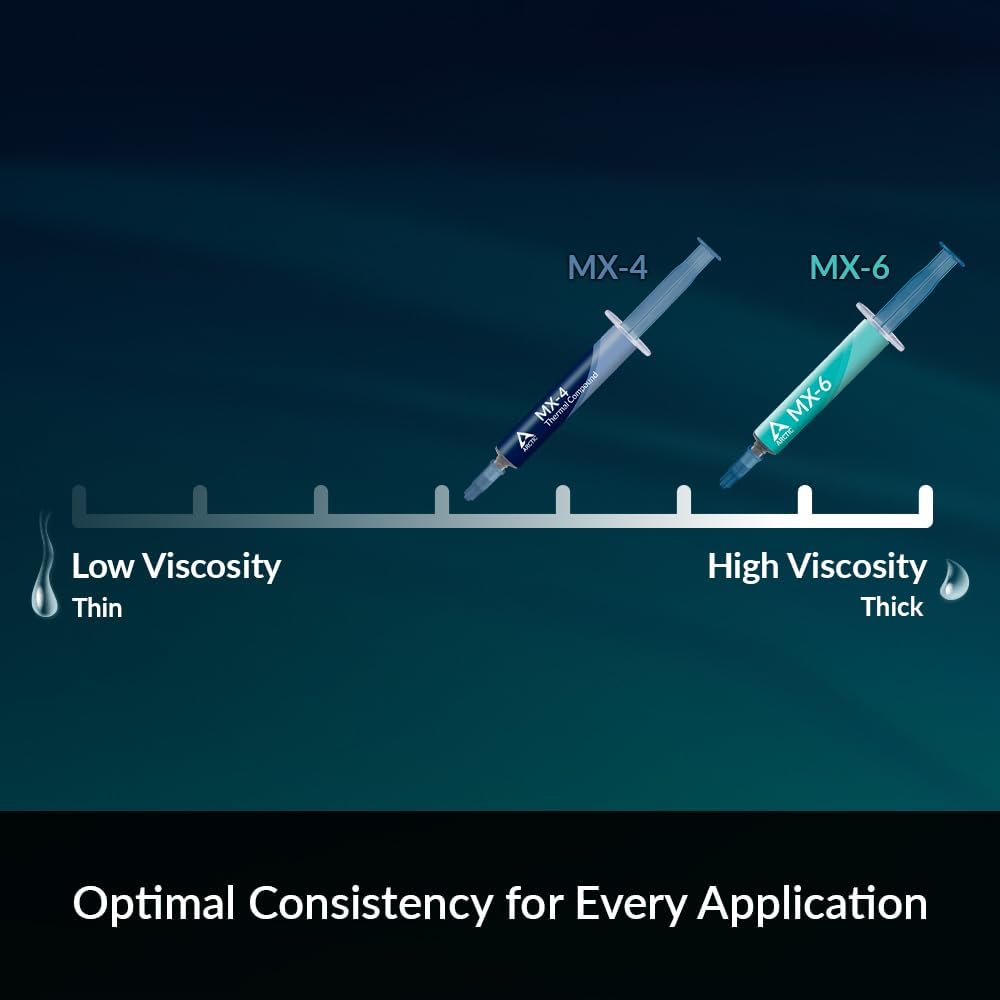
Arctic MX-4 has become the default recommendation for multi-point console applications — specifically PS4 and Nintendo Switch repastes — because of its viscosity sweet spot. Owners describe it as “spreadable without being runny,” which matters when you’re dotting paste onto four GDDR5 chips that sit 2–3mm apart. The bleed risk between tightly spaced points is real: too thin a paste (like liquid metal) flows laterally under pressure, and too stiff a paste doesn’t seat evenly without perfect heatsink alignment. MX-4’s consistency sits in a workable middle ground, and owners report clean, controlled application even without a spreader tool. Tom’s Hardware’s ongoing TIM roundup consistently places MX-4 within 1–2°C of significantly more expensive options in real-world socket conditions — which translates directly to console repaste scenarios where clamping pressure is lower and less consistent than a desktop retention bracket.
Arctic MX-6 raises the performance ceiling meaningfully — TechPowerUp’s 2024 TIM benchmark places it among the top performers in its class — but owners flag a real practical limitation: stiffness. Multiple laptop repaste reviewers describe MX-6 as noticeably harder to work with in tight spaces. “Stiff” is the word that comes up repeatedly. If you’re applying it to a laptop die that’s recessed in a chassis cavity with limited tool access, that stiffness means you either need a thin spreader or you’re accepting an imperfect blob application. The reward for that friction is measurable: owners of six-year-old laptops report dramatic fan-noise reductions after repasting with MX-6, with one frequently cited pattern being a shift from constant high-RPM operation to near-silent idle after the first thermal cycle seats the paste. PCMag’s 2025 laptop thermal paste overview names MX-6 as a top pick for performance-first users who don’t mind the application learning curve.
Thermal Grizzly Kryonaut occupies a specific niche in laptop repastes: excellent out-of-the-box performance, but with a documented durability limitation in thermally aggressive environments. Owners and long-run reviewers consistently note that Kryonaut begins to degrade noticeably after 12–18 months inside a power-limited laptop that regularly hits its thermal ceiling. The mechanism is dry-out: Kryonaut’s zinc oxide formulation performs beautifully when fresh but loses conductivity faster than carbide-based pastes when the interface repeatedly cycles through 90°C+. The practical implication is that a laptop repaste with Kryonaut is not a “set it and forget it” fix — plan to revisit in 12–18 months if the machine runs hot regularly.
Phase-Change and Solid-State Materials: PTM7950, KryoSheet, and PhaseSheet
This is where the laptop-specific conversation gets interesting. Phase-change materials (PCMs) are solid pads at room temperature that liquefy and conform to surface irregularities once the chip heats up. Graphene pads are rigid ultra-thin sheets with very high in-plane thermal conductivity.
Thermal Grizzly KryoSheet is the graphene pad that generated the most owner discussion in 2024–2025. KitGuru’s review notes it as genuinely competitive with high-end pastes in low-contact-resistance scenarios. The cutting challenge is real: owners universally warn that KryoSheet must be scored with a sharp blade and snapped — not cut with scissors — to avoid cracking the graphene lattice. The payoff is a material that doesn’t pump out under lid flex, doesn’t dry out, and doesn’t require replacement on any foreseeable schedule. For laptop users who dread the idea of ever disassembling their machine again, this characteristic is the primary selling point.
PhaseSheet PTM7950 takes a different approach: it’s a polymer film that transitions to a viscous, conforming state above roughly 45°C, then re-solidifies when the machine cools. Igor’s Lab’s long-term PTM7950 test documents that the material’s pump-out resistance is substantially better than silicone paste because it doesn’t remain fluid continuously — it cycles between states. One PhaseSheet reviewer’s comment, widely cited in aggregated discussions, captures the appeal precisely: they stated they “will never open their laptop again” after switching to a phase-change pad, because the performance holds across thousands of thermal cycles without degradation. Cutting PTM7950-based pads follows the same rule as KryoSheet: score and snap, don’t shear.
A quick note on liquid metal: Products like Thermal Grizzly Conductonaut deliver the highest conductivity ratings available, but they are electrically conductive and will damage SMD components on contact. Laptop and console use is strongly discouraged by manufacturers and verified by owners who have documented shorting incidents. This guide does not recommend liquid metal for any console or laptop application.
Thermal Pads for VRMs and Memory: Arctic TP-3 and the Stacking Question
Heatsinks in laptops don’t just contact the CPU die — they often press against VRM (voltage regulator module) components and memory chips via thermal pads (compressible foam-like sheets that fill irregular gaps). Arctic TP-3 is the pad that comes up most in budget-to-midrange laptop maintenance discussions.
A recurring owner question: can you stack TP-3 pads to fill a larger gap? The short answer from owners who have tried it is: cautiously yes, but with limits. A single pad layer compressed to spec performs predictably. Two layers introduce an additional interface boundary that adds resistance, and alignment becomes harder. If the gap you’re filling is genuinely larger than a single pad’s uncompressed thickness, owners recommend measuring the gap first and selecting the appropriate single-thickness pad rather than stacking as a workaround. TP-3 comes in multiple thickness variants specifically to address this.
By the Numbers
| Material | Conductivity (W/m·K) | Pump-Out Risk | Laptop Reopen Interval |
|---|---|---|---|
| Arctic MX-4 | 8.5 | Medium | 2–3 years |
| Arctic MX-6 | 12.5 | Medium | 2–3 years |
| Thermal Grizzly Kryonaut | 12.5 | Medium-High | 12–18 months (hot laptops) |
| PTM7950 / PhaseSheet | 13.0 | Very Low | 5+ years (owner reports) |
| KryoSheet (graphene) | ~18 in-plane | Negligible | Indefinite |
Conductivity figures per manufacturer spec sheets. Interval estimates reflect owner-reported patterns across aggregated reviews, not site-verified testing.
The NT-H2 Cleaning Kit Advantage
One product that earns disproportionate praise for a seemingly minor feature: Noctua NT-H2 with the included cleaning wipes. The paste itself is well-regarded — HardwareLuxx’s review places it competitively among premium pastes — but the story in laptop repaste contexts is the wipes. Owners repeatedly describe being mid-disassembly with old paste to remove and no IPA readily available, and the included wipes solving that cleanly. For a laptop where dried paste has been baked on for years, having a solvent-impregnated cleaning wipe specifically designed for thermal interface removal is meaningfully faster than improvising. The wipes also leave no residue on nearby components, which is the other concern owners raise — any solvent applied near flex cables and capacitors needs to evaporate cleanly.
Frequently Asked Questions
How many application points does a Nintendo Switch need, and does paste bleed between them? Owners who have documented Switch repastes typically report two primary contact points: the Tegra SoC and the NAND storage module. A small pea-dot on each is the standard approach. Bleed between them is a real risk if you over-apply — the two points sit close together, and runny paste under heatsink pressure can bridge them. MX-4’s viscosity is specifically why owners favor it here: it doesn’t flow laterally under light clamping pressure.
Will the MX-6 lemon-scented cleaner leave residue on laptop components? Owners who have used Arctic’s cleaning solution (included with some MX-6 kits) consistently report no residue on nearby components when applied carefully and allowed to fully evaporate before reassembly. The scent additive is cosmetic and doesn’t affect the solvent’s behavior. Standard caution applies: apply to a cloth or swab first, not directly to the PCB.
How do I cut KryoSheet or PhaseSheet PTM without cracking it? Score the cut line firmly with a sharp craft knife or razor blade against a metal straight-edge, then apply gentle bending pressure to snap along the score. Do not use scissors — the shearing action cracks the graphene lattice or creates uneven edges in PTM film. Multiple owners describe practicing on a scrap edge first before cutting to final dimensions.
Does NT-H2 work as well as Kryonaut on a PS5 repaste? Based on published spec comparisons, NT-H2 and Kryonaut sit within a fraction of a degree of each other in controlled benchmarks (per TechPowerUp’s 2024 roundup). Owners who have repasted PS5 units with NT-H2 report results consistent with Kryonaut repastes documented elsewhere. The practical differentiator is the included cleaning wipes — for a PS5 where the old paste has been baking for 4+ years, that cleaning advantage is real.
Can I stack Arctic TP-3 pads to fill a larger laptop VRM gap? Technically possible, but not ideal. Each additional pad layer adds a thermal interface boundary. Owners recommend measuring the actual gap with a feeler gauge or by checking the heatsink contact marks, then selecting the single TP-3 thickness that fills it correctly. Arctic offers TP-3 in 0.5mm through 2.0mm variants for exactly this reason.
How long does Kryonaut last in a thermally constrained laptop before it needs replacing again? Owners consistently describe performance degradation beginning at 12–18 months in laptops that regularly sustain 90°C+ junction temperatures under load. In lighter-use machines that rarely hit thermal limits, some owners report satisfactory performance at 24 months. The pattern is clear enough that if your laptop runs hot constantly, plan Kryonaut as an 18-month maintenance item — or consider PTM7950 or KryoSheet as a longer-term alternative that sidesteps the reopen cycle entirely.
If X, Then Y: The Decision Rule
If you’re repasting a PS4, PS4 Pro, or Nintendo Switch with multiple contact points: Arctic MX-4. The viscosity is matched to the application, the price leaves no reason to compromise, and owners consistently report clean results without bridging.
If you’re repasting a hot laptop and want measurable noise reduction now: Arctic MX-6 for the performance, but budget time for the stiff application. Accept a 2–3 year reopen window.
If your laptop runs at sustained high temperatures and you want to avoid opening it again: PTM7950 / PhaseSheet or KryoSheet. The higher upfront cost and cutting learning curve pay back in pump-out resistance over years. Igor’s Lab’s long-term data supports this framing for thermally aggressive mobile use.
If you need an integrated clean-and-repaste kit with no IPA sourcing required: NT-H2 with the cleaning wipe kit. The paste is excellent; the wipes are the reason to pick it over alternatives for a one-kit solution.
If you’re doing a PS5 repaste and weighing paste options: NT-H2 or MX-6. Kryonaut works — but given the PS5’s reputation for sustained high temps, its 12–18 month durability ceiling is worth factoring against a console you’d prefer not to open on a schedule.
Here’s where you can buy the products named in this guide — if you click through, we may earn a small commission. It doesn’t change our picks.